Friday Night Funkin' VS (FNF VS) is a new MOD that allows us to play FNF online in multiplayer mode against other players without the need for port-fordwading, which makes the process much easier for users who do not have much knowledge on the subject. This is a MOD similar to FNF Multiplayer, but easier to use. Also, it should be emphasized that FNF VS allows us to play MODs against our friends (or anyone else who wants to join the room).
FNF VS offers different options to create lobbies of FNF online, but the most remarkable and the one that makes it a very interesting novelty is undoubtedly the one that allows us to create lobbies without port-fordwading. These are the main options of this new version of FNF Multiplayer Online:
- Allows you to create and join FNF lobbies, including the ability to play online MODs in those lobbies
- Allows to create and join lobbies by using servers, providing an IP for it. This is the method that was already available up to today.
- It has a menu of options to customize some details (such as hiding the chat).
Remember that all players participating in a lobby will need the files of the MOD you want to play.
How to play FNF Multiplayer Online with FNF VS
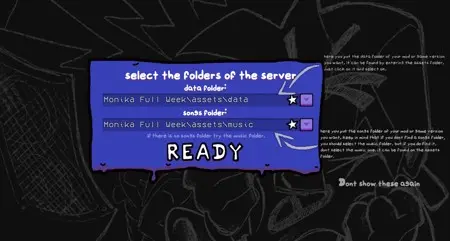
In order to create or join a Lobbie you will need the files of the MOD you want to play in that Lobbie, or the ones required in the Lobbie you want to join. The MOD itself indicates the files you need to select from the MOD files to play. You will have to show the MOD the path to the data and music folder of the MOD you want to play online in the lobbie. The same applies for when you want to join a lobbie, you will have to select the same folders of the same MOD as the one selected by the creator of the lobbie in question.
New features of Friday Night Funkin' VS FNF MOD
- Allows you to play online with other players in both public and private rooms with the MOD of your choice when creating the lobbie.
Latest updates of Friday Night Funkin' VS
- v0.0.9 - update that includes some of the most famous MODs inside FNF VS, ready to play from the MOD if you don't want to waste time putting and removing MODs. This update allows you and your friends to play online a total of 98 different songs with just a couple of clicks inside FNF VS. For this reason, it is clear that this MOd has moved up the rankings in terms of quality.
- v0.0.7.1
Download Friday Night Funkin' VS
Link - Download